This data cleansing feature allows you to change the values in a column - based on values in that or other columns.
This feature is very powerful, yet easy to use.
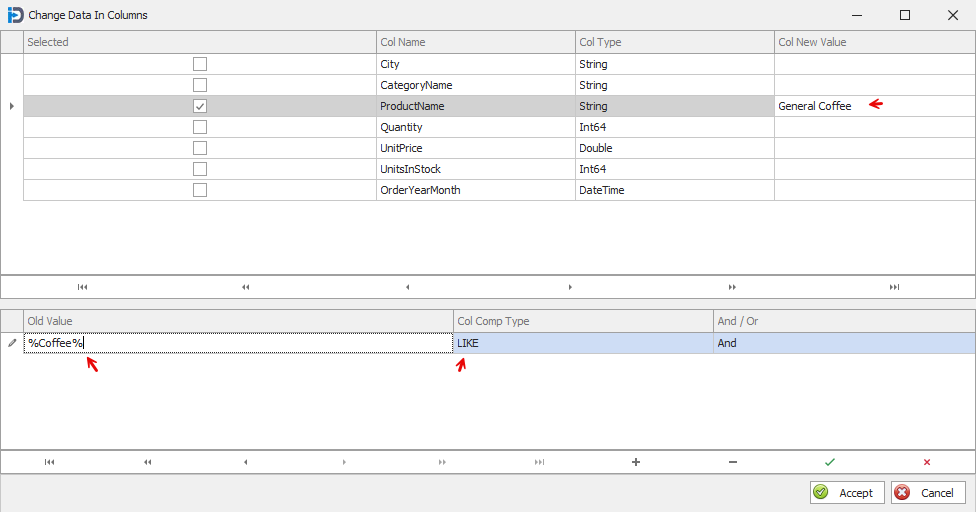
Once you have a data table selected in the Actions screen - you can choose the Column Data Manipulation option from the Data Cleaning drop down button. The following screen will then be displayed. It shows each column in the data table. You can select a column and enter a New Value (the value you want in the column). Then in the details grid at the bottom - you can enter the string you want to search for - the type of comparison and choose and And/Or value. The Old Value you enter can be exact or partial (as shown in the example below).
The program will select all rows that have the column values you have chosen (Old Value in the detail grid at the bottom) and then change the selected column(s) to the New Value(s) that you have entered. It is possible to change the values of multiple columns in one pass if you select multiple columns in the upper grid.
Once you have clicked the Accept button - the changes to the data table will be made.
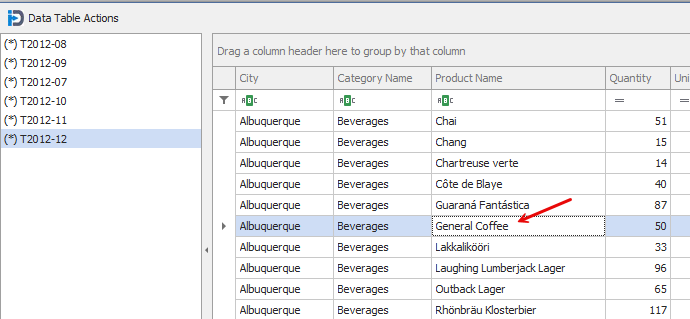
In the screen capture below you can see that is has changed the brand name coffee to "General Coffee" - based on the request outlined in the screen capture above.